
Naughty Random Live Video Chat
Leading Edways LtdSocial
4.1372.00 Reviews
- Version
- 60.0.18
- Installs
- 100.00K
- Age Rating
- Mature 17+
Screenshots

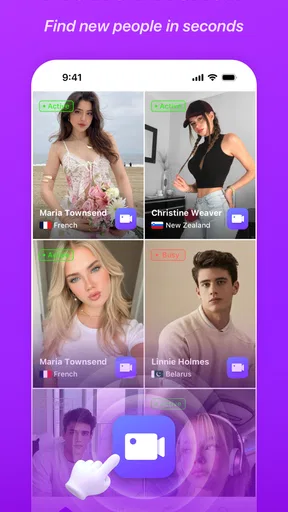
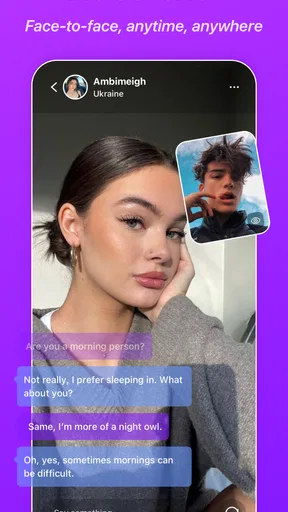
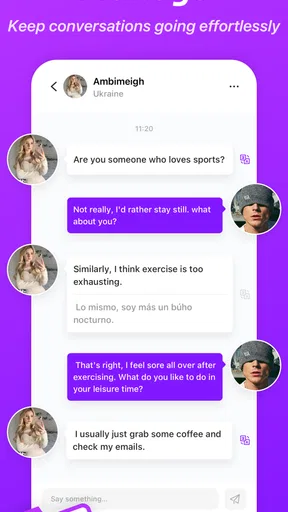

Our Review of Naughty Random Live Video Chat
 Analysis by Appyee
I approached Naughty Random Live Video Chat as a social app for spontaneous conversations rather than as a general-purpose messenger. Its focus is live interaction through text, voice, and video, so the experience feels closer to meeting someone new than maintaining an organized list of familiar contacts. That distinction matters when deciding whether it belongs on a personal phone, a shared tablet, or a household device.
My first impression was that the app is built around immediacy. You open it expecting interaction, not a long setup process or a feed that requires careful curation. The store summary presents it as a way to communicate through several formats, while the short description is deliberately blunt: “Naughty Random.” That wording gives a clear clue about the atmosphere, but it also means I would not treat the app as a neutral chat utility.
It is a free social app from Leading Edways Ltd, with optional purchases ranging from $1.99 to $144.99 per item. The app carries a Mature 17+ rating, and that is one of the most important facts to consider before installing it anywhere other people may use the device. In my view, the audience and context are more significant here than the simple fact that the download itself costs nothing.
How the experience fits into everyday communication
I find this app easiest to judge when I treat it as a place for brief, spontaneous conversations, not as a replacement for the messenger I use with people I already know. That distinction helps me decide what to share, which communication mode feels right, and when a chat has run its course. With that everyday role clear, the next question is how to approach a first session calmly.
A shared-device situation changes the decision
Imagine a household tablet sitting on a kitchen counter. One adult installs this app for private conversations, then leaves the device available for a partner, an older teenager, or a visiting friend. The app may be easy to launch, but the social context is not easy to separate. A person picking up the tablet could encounter an app intended for mature users, notifications, open conversations, or account activity that was not meant for them.
That is why I would use it on a personal device rather than a family device. The issue is not just privacy in the technical sense. It is also about avoiding accidental exposure and keeping different people’s social spaces apart. A shared screen can make a private app feel public very quickly, especially when live video is part of the experience.
For an adult who wants casual contact with people outside an existing friend group, the app has a straightforward appeal. Text can be less demanding when I am in a noisy place, voice can feel more natural when typing is inconvenient, and video offers the most direct form of interaction. I would not expect all three modes to suit the same conversation, so switching based on the situation is more useful than treating video as the default.
A practical routine is to begin with text, move to voice only when the exchange feels comfortable, and use video selectively. That sequence gives me more control over how quickly a conversation becomes personal. It is a small habit, but it makes a random-chat service feel less impulsive and more manageable.
What I would check before handing over the phone
Because the app is aimed at mature users, I would not install it on a phone that children regularly borrow. I would also avoid leaving it signed in on a device used for presentations, travel check-ins, or family communication. Even without assuming anything about the app’s policies, a live social service deserves its own boundary.
On a personal phone, I would review the device’s notification behavior before using the app regularly. A message preview appearing on a lock screen can reveal more than intended. I would also consider whether incoming calls, voice activity, or video conversations could interrupt work or appear unexpectedly in a shared room. These are ordinary phone-management concerns, but they matter more when conversations involve strangers.
I would keep the app separate from the communication tools I use for close friends, work, or relatives. That separation makes it easier to recognize which conversations are casual and which deserve a higher level of trust. It also reduces the chance of replying to the wrong person when several chats compete for attention.
The free entry point is useful for trying the basic experience, but I would be careful around optional purchases. The range from $1.99 to $144.99 per item is wide enough that I would never tap through a purchase casually. Before spending, I would identify exactly what the item does, whether it is one-time or repeatable, and whether the benefit is genuinely useful to my way of using the app.
Boundaries are more useful than enthusiasm
Random communication can be entertaining because it removes the pressure of maintaining a carefully chosen social circle. At the same time, the lack of an existing relationship means I have less context for judging the other person. I would avoid sharing my address, workplace details, daily routine, financial information, or private images. That advice is especially important when a conversation moves quickly from text to voice or video.
I also would not assume that a friendly conversation is automatically a trustworthy one. A pleasant tone can make people disclose more than they intended. My preferred approach is to keep early chats light, end conversations that become uncomfortable, and avoid feeling obligated to continue simply because the other person is waiting for a response.
One useful trade-off is that video may help me decide whether a conversation feels genuine, but it also reveals more about me than text does. My surroundings, voice, appearance, and daily habits can all become visible. If privacy matters, text is the better starting point; if a conversation becomes meaningful, voice may offer warmth without exposing as much of the room.
Coordinating use in a household
I would not rely on the app itself to manage household expectations. Instead, I would make the boundary clear outside the app: whose account it is, which device is appropriate, and when the device is available. This is particularly important when several people share one Apple or Android device and may assume that every installed app is intended for everyone.
For couples or adult housemates, a simple agreement can prevent most misunderstandings. I would decide whether notifications should remain visible, whether the app should be used only with headphones, and whether conversations can take place in shared rooms. These are not app features; they are practical rules that match the live nature of the service.
Headphones are helpful for more than convenience. They reduce the chance that a nearby person hears a conversation unexpectedly, and they make it easier to focus on the other participant. I would still avoid using video in a room where other people might appear in the background without knowing it. A private conversation should not accidentally include everyone around the device.
If two adults want to use the same tablet, I would prefer separate device accounts or separate user profiles where the operating system supports them. If that is not available, I would sign out after use and avoid saving access details. The extra step is slightly inconvenient, but it is better than confusing one person’s conversations with another’s.
Trust develops slowly here
The app’s Mature 17+ rating should guide the entire decision, not just the download choice. I would interpret it as a reason to keep the app away from younger users and to discuss its presence openly in a household with teenagers. A mature label does not tell me that every interaction will be unsuitable, but it does tell me that this is not an app I would casually place beside child-oriented games or family messaging tools.
For a young person who needs a safe way to talk with classmates, I would choose a service built around known contacts and adult oversight rather than random live communication. The usual alternative, such as a familiar messenger, is less exciting but gives me more context about who is on the other side. For adults seeking novelty, that loss of spontaneity may be the point; for minors, it is a serious disadvantage.
I would also be cautious about moving a conversation to another service too quickly. A stranger who asks for a phone number, social profile, email address, or private photos is asking me to remove the boundary that the original app provides. Keeping early contact within the app gives me a clearer stopping point. If the conversation becomes pushy, ending it there is simpler than managing access across several platforms.
Trust is also about consistency. If someone’s story changes repeatedly, pressures me to spend money, or reacts badly when I decline video, I would leave. The ability to communicate by text, voice, and video should give me choices, not create an expectation that I must use the most revealing option.
How it compares with familiar alternatives
Compared with a standard messenger, this app is more oriented toward meeting unfamiliar people. A conventional messenger is usually strongest when I already know the recipient and need dependable coordination, group planning, file sharing, or ongoing contact. I would choose that kind of tool for family schedules, work discussions, and conversations where identity is already established.
Compared with a video-calling app used by friends or relatives, Naughty Random Live Video Chat offers a different kind of discovery. The attraction is the possibility of an unexpected conversation, while the cost is reduced context and a greater need for personal judgment. If my goal is to speak with someone I trust, a regular video-call service is the better fit. If my goal is casual interaction beyond my existing circle, this app is more aligned with that purpose.
It also differs from a public social network. A social feed lets me observe profiles, posts, and shared interests over time before starting a conversation. Here, the communication itself is likely to be the main event. That can feel faster and more personal, but it gives me fewer signals to assess before engaging.
My advice is to decide based on the type of relationship I want. Choose a familiar messenger for reliable coordination, a conventional video service for known contacts, and this app only when the uncertainty of meeting someone new is part of the appeal.
Version, access, and practical expectations
The app is currently listed as version 60.0.18 and supports Android 8.0 or newer. That makes it accessible on a broad range of Android phones and tablets, although the quality of a live conversation will still depend on the device, connection, microphone, camera, and surrounding noise. I would test it in the place where I actually expect to use it rather than judging the experience from a quiet room alone.
Live communication is sensitive to interruptions. A weak connection, a busy background, or a nearly empty battery can make a conversation frustrating even when the app itself is functioning properly. I would keep the phone charged, use a stable connection, and avoid starting a video exchange while walking through a crowded area. Text is the more forgiving option when conditions are unpredictable.
The app has reached over 100K installs, with an average rating of 4.1 from around 1.9K ratings and 372 written reviews. Those figures suggest that it has attracted a meaningful audience, but they do not remove the need to decide whether its mature, random-chat style suits me. Popularity can make it easier to find activity; it does not guarantee that every interaction will be worthwhile.
Who will get the most from it
I think it works best for adults who enjoy brief, unplanned conversations and are comfortable setting their own limits. It may suit someone who finds ordinary messaging repetitive and wants the option of text, voice, or video depending on the moment. It can also be useful for a person who wants social contact without committing to a long-term group or public profile.
The strongest users will be selective rather than endlessly available. They will know when to remain in text, when to end a conversation, and when not to reveal personal information. They will also treat purchases carefully instead of assuming that spending will improve every interaction.
I would skip it if I need verified identities, dependable contact with family, professional communication, or a child-friendly environment. I would also skip it if random conversations make me uncomfortable or if I tend to feel pressured to answer every message. In those cases, a familiar-contact messenger provides more control and a clearer purpose.
My household verdict
After considering the app as both a social tool and a household-device decision, I see it as a personal-use service rather than a shared one. The free download makes experimentation easy, but the Mature 17+ context, live interaction, optional purchases, and random-chat format call for deliberate boundaries. I would keep it on an adult’s private phone, not on a family tablet or a device that children use without supervision.
My most useful routine would be simple: start with text, move to voice only when comfortable, use video selectively, keep identifying details private, and leave any conversation that becomes demanding. I would also review purchase prompts carefully and keep notifications discreet when the phone is used around other people.
Leading Edways Ltd has positioned the app around immediate social contact, and that focus is clear in daily use. It is not the best replacement for a normal messenger, nor would I recommend it as a general household communication app. For the right adult user, though, it can provide a quick way to explore conversations outside an established circle.
My recommendation is cautious but positive for adults who want spontaneous live chat and are willing to manage the boundaries themselves. If privacy, known contacts, family sharing, or predictable communication matters more than novelty, I would choose a conventional alternative instead.
Verdict
Strengths of Naughty Random Live Video Chat
- Meet people worldwide through spontaneous live video chats.
- Simple interface makes starting conversations quick and easy.
- Useful filters help narrow matches by preferred interests or location.
- Live interaction feels more personal than text-based social apps.
- In-app reporting tools can help flag inappropriate behavior.
Limitations of Naughty Random Live Video Chat
- Random video matching may expose users to offensive or unwanted content.
- Some features may require coins, subscriptions, or other in-app purchases.
- The quality of conversations depends heavily on who you are matched with.
- Video chatting can use significant mobile data and battery power.
- Privacy risks remain if users share personal details or reveal their surroundings.
Similar Picks in This Category
View All
Meta Platforms, Inc.4.6

Instagram4.0

Likee-Live, Chat & Party Games
Likeme Pte. Ltd.4.4

Facebook Lite
Meta Platforms, Inc.4.5

TikTok - Videos, Shop & LIVE
TikTok Pte. Ltd.4.0

Moj: Free Short Drama & Reels
ShareChat4.1
Frequently Asked Questions
What is Naughty Random Live Video Chat?
Naughty Random Live Video Chat is a social communication app designed for meeting strangers through live video interactions. It typically matches users with random participants so they can chat, discover new people, and move between conversations. Because the experience depends on the people available online, the quality of chats can vary, and users should review the app’s current features, age rating, and regional availability before downloading.
Is Naughty Random Live Video Chat safe for everyone?
No social video-chat platform can guarantee a completely safe experience, especially when conversations involve strangers. Users should avoid sharing their real address, phone number, passwords, financial information, or private photographs. Use blocking and reporting tools whenever someone behaves abusively or requests inappropriate content. Parents should also supervise younger users and check the official age requirement, since this type of app may not be suitable for children.
Does the app require a camera, microphone, or personal account?
The main purpose of Naughty Random Live Video Chat is live communication, so camera and microphone permissions may be required for video conversations. Depending on the version, the app may also request an account, profile details, or access to notifications. Before accepting permissions, read what each one is used for and deny anything that is not necessary. You can usually change these permissions later in your device settings.
Is Naughty Random Live Video Chat free to use?
The app may offer free access to basic video-chat features, but some functions can be limited by advertisements, virtual credits, subscriptions, or in-app purchases. Pricing and available features may differ between Android and iOS, as well as by country. Check the store listing carefully before downloading, and review the subscription terms so you understand renewal dates, cancellation procedures, and any possible charges.
What should I do if I encounter inappropriate or suspicious behavior?
If another user sends offensive messages, displays inappropriate material, pressures you to share personal information, or attempts to move the conversation to an unsafe platform, end the chat immediately. Use the in-app report and block options, and keep evidence when appropriate. Never send money or private content to strangers. If you feel threatened or believe a minor is at risk, contact the relevant platform support team or local authorities.
